Photos & privacy
Photos, originals, and metadata
Moments prepares responsive web renditions without treating them as the whole archive. The uploaded original remains part of your data, while appropriately sized versions and a soft placeholder keep the public journal practical across screens and connections.
The original and the web rendition
For ordinary web-ready formats, Moments can display transformed versions appropriate to the reader's screen while retaining the uploaded file as the original. These delivery versions are conveniences, not replacements for the file you entrusted to the journal.
HEIC, HEIF, and HIF photographs need special handling because browser and image-service support is uneven. Moments makes a full-resolution JPEG rendition for the web and keeps the untouched original alongside it. The original, not only the JPEG rendition, is included in your export.
Camera details Moments can read
When present in the file, the upload flow reads a focused set of EXIF fields: camera make and model, lens, focal length, aperture, shutter speed, ISO, original capture time, and GPS coordinates. Missing metadata is normal; exported, scanned, edited, and privacy-stripped photographs often contain only part of it or none at all.
Dimensions, file type, original filename, and file size are also retained as part of the photograph record. The captured date for the moment remains an editable journal choice rather than an irreversible assumption made from one frame.
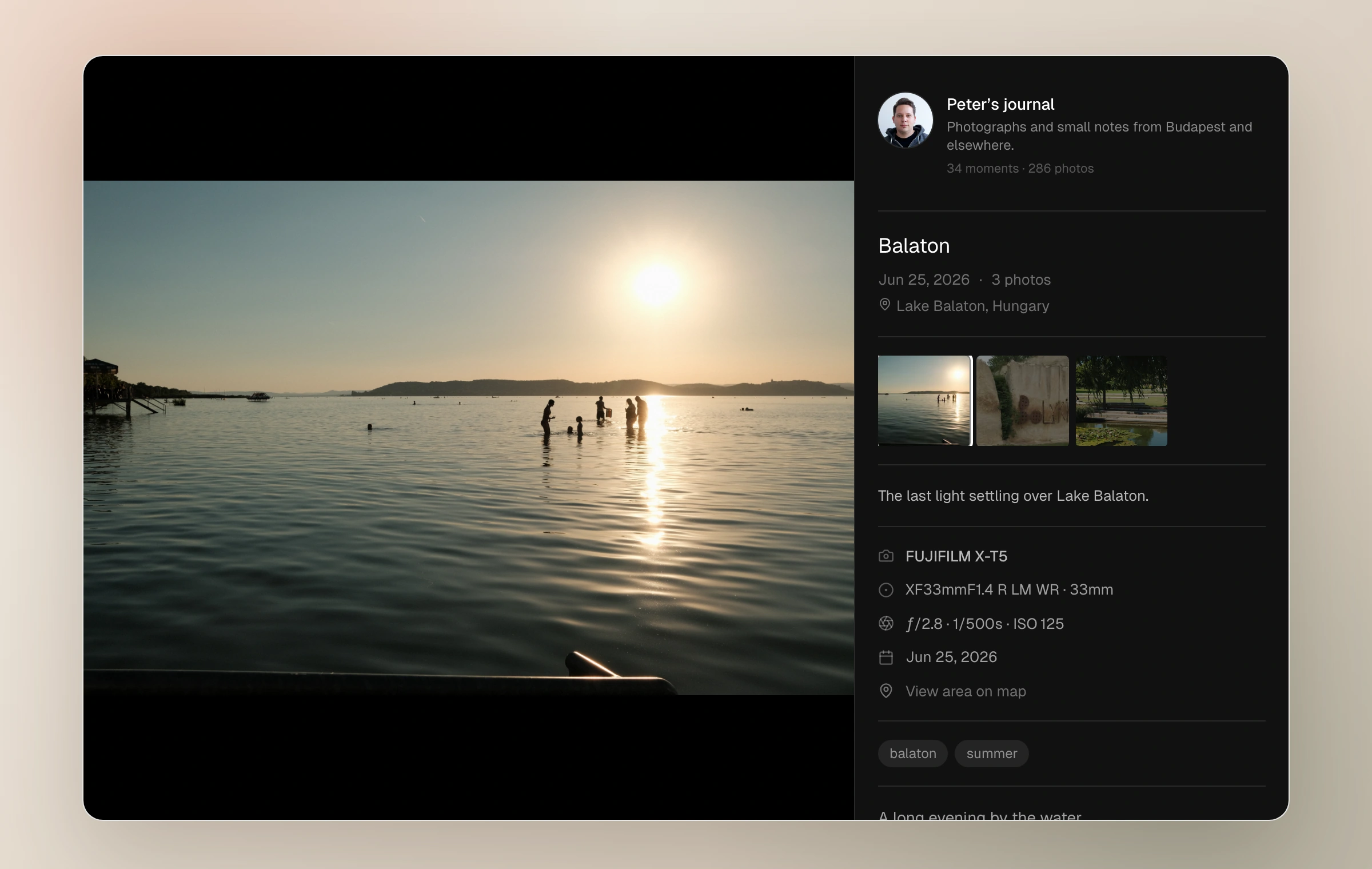
- Camera: make and model
- Lens and focal length
- Aperture, shutter speed, and ISO
- Original capture time
- Latitude and longitude when GPS is present
Metadata deserves a privacy check
Camera metadata can be useful photographic context, but GPS can describe a private place with uncomfortable precision. Review sensitive source files and the information you choose to publish, especially for photographs made at home, around children, or in protected natural locations.
When coordinates are stored for a published photograph, its lightbox information panel can offer a map link using the exact latitude and longitude. Treat that as public location data, not merely hidden archival metadata.
Visibility controls access to a moment; they are not a substitute for removing information you never want to share. Unlisted links can be forwarded, and anyone given a password can see the protected moment after unlocking it.
How storage is counted
Storage is based on original photo bytes for photographs that have not been deleted. A monthly upload allowance counts photographs finalized into a journal during the current UTC calendar month. There is also a per-moment photograph limit and a 20 MB per-file ceiling.
Removing photographs can reduce stored originals, but it does not turn the monthly upload counter into a revolving door. The dashboard's usage meter is the reliable view of what the current plan has used and what remains.
Keep reading
Related guide
Create a moment
Upload and arrange a set, add its field note and context, and decide how it should leave the draft.
Related guide
Captions, alt text, and the lightbox
Add meaning to individual frames and understand the focused viewer readers use to move through a set.
Related guide
Plans, upload limits, and storage
Understand Starter and Moments Plus allowances, what each limit counts, and what changes if paid access ends.
Related guide
Export your journal
Download original photographs, everything you wrote, structured journal details, and a static website you can open offline or host yourself.